Mac · v0.1 For creators who post every week

Know what you've said.
Know when to say it again.

Sourdough Space is a private memory for your content. It keeps every idea, every time you posted it, and how it did. Claude drafts. You decide.

Sourdough Space for Mac, version 0.1. Not public yet.
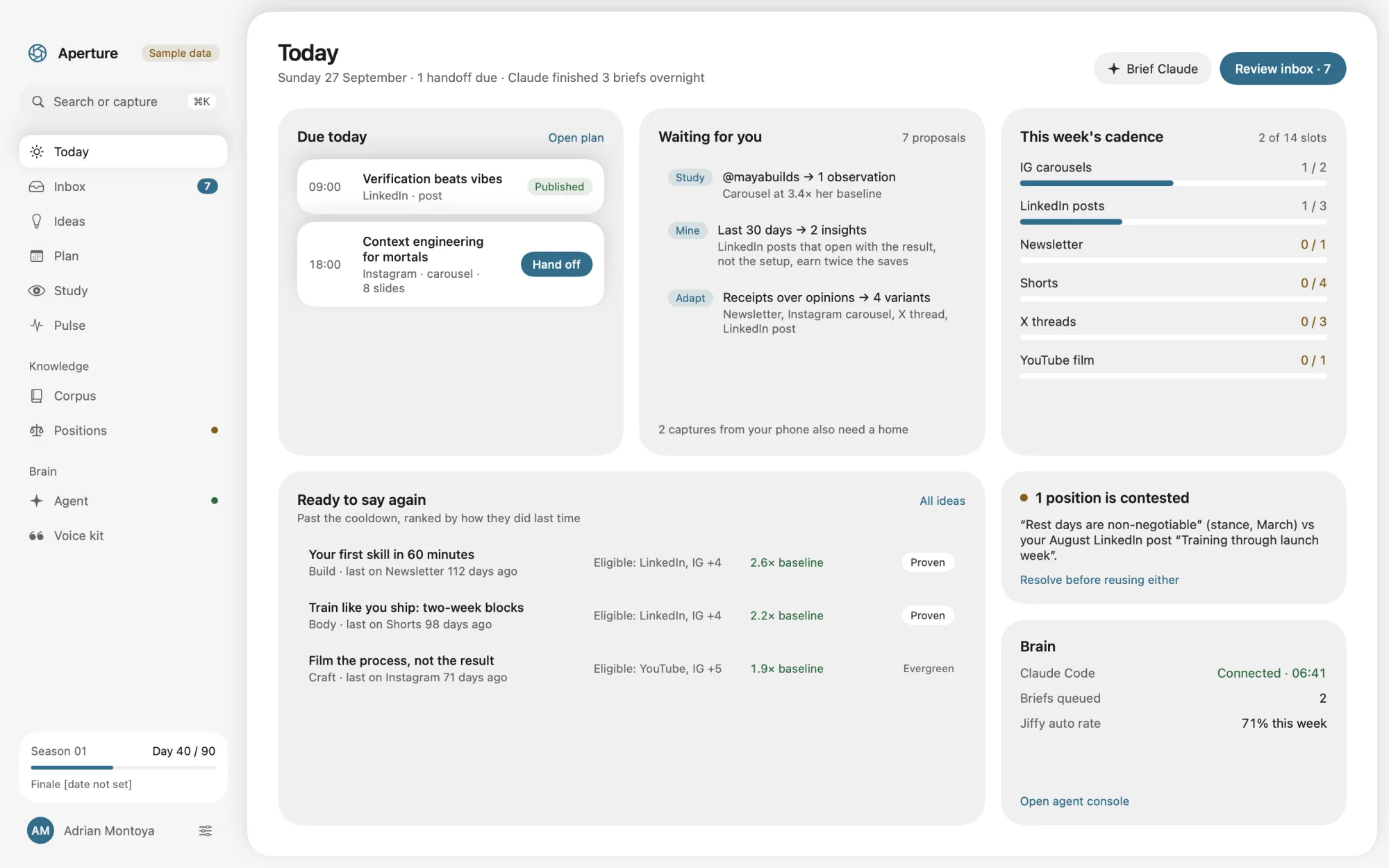
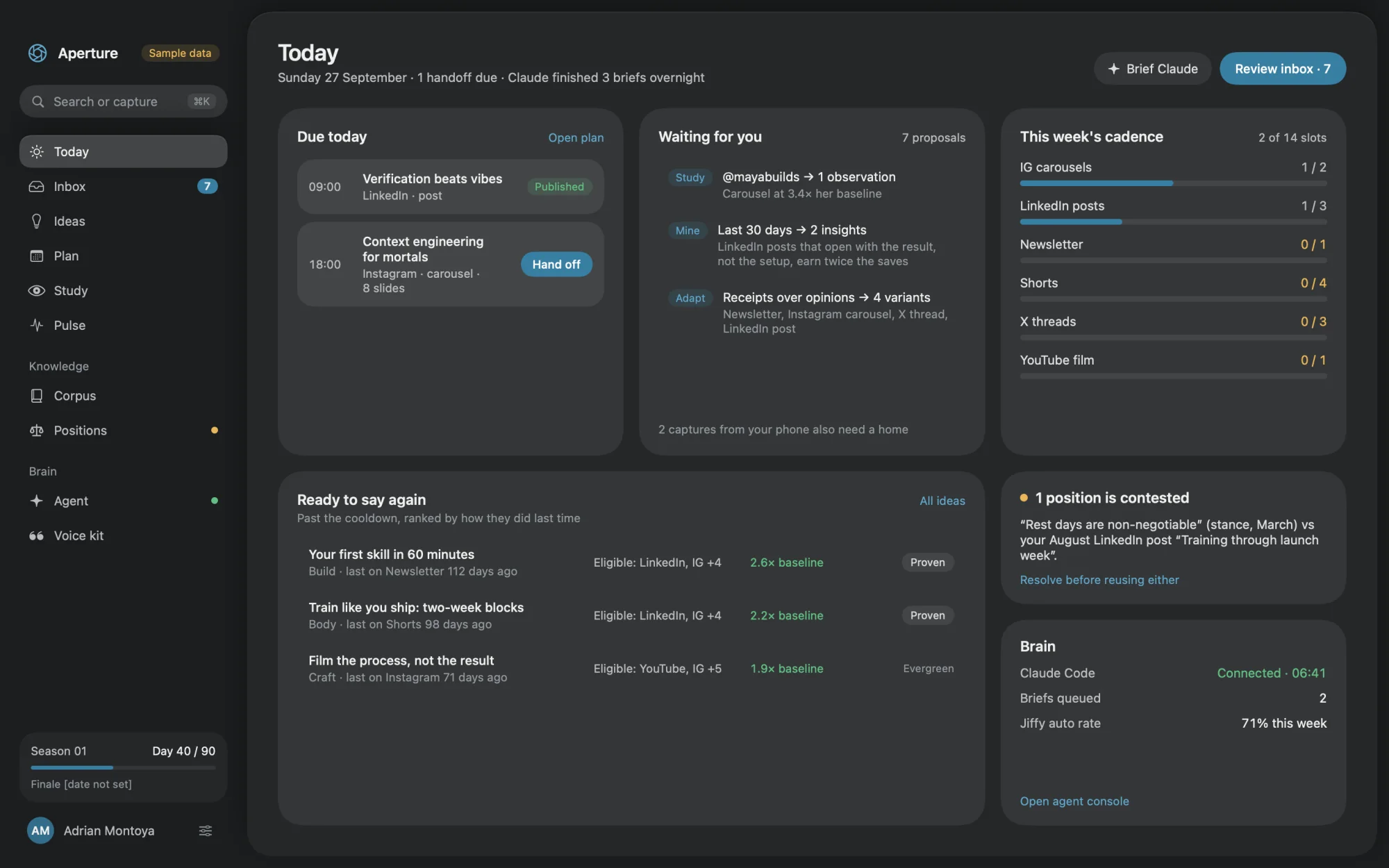
Sourdough Space's Today screen: what's due, what's waiting for review, this week's posting rhythm, and ideas ready to say again. Sourdough Space's Today screen in dark mode: what's due, what's waiting for review, this week's posting rhythm, and ideas ready to say again.

Plans and tracks your work on

LinkedIn
X
Instagram
YouTube
Shorts and TikTok
Newsletter

You have posted hundreds of times. A few ideas worked. Most were forgotten. So you repeat yourself by accident, contradict yourself in public, and let your best ideas die after one post.

Sourdough Space remembers all of it, so you can spend your time making things.

How it works

Three jobs. One is yours.

Sourdough Space never writes or posts on its own. It keeps the memory and the rules, and everyone stays in their lane.

01

You bring the ideas

Catch a thought in two seconds. Import your old posts, notes and voice memos so Sourdough Space knows what you have already said.

YYou
02

Claude does the drafting

Claude Code reads Sourdough Space and writes a version for each platform. Every claim has to cite something you wrote, or it is refused.

Claude
03

You make every call

Accept, edit or reject. Schedule it. Post it yourself. Sourdough Space logs it and learns what worked, so next week is smarter.

YYou
Idea

One claim in your own words. Not a post. An idea can become many posts.

Reuse ledger

The history of an idea: every platform, every date, and how each post did.

Corpus

Everything you have already written or said. It is what drafts are checked against.

Stance

Something you believe, written down and dated, so a new post can't quietly contradict it.

Guided tour · 10 steps

From a stray thought to a post that worked.

Scroll, or use ← →

Two gates

Claude can't make things up. Or contradict you quietly.

Every draft passes two checks before it reaches you. Try to sneak a line past them.

Add a line to the draft
LinkedIn postDraft from Claude
Hook
I stopped posting opinions I can't prove.
Story
In March I wrote one rule into my stance document: no receipt, no claim.1

Sample idea from Sourdough Space's demo library. Gate wording simplified.

Everything inside

One calm place for all of it.

Every screen has one job. Nothing is hidden, and nothing gets in the way.

Reuse ledger

Every idea remembers where it has been.

Each idea keeps a timeline: every platform, every date, how it did. Sourdough Space tells you when it is safe to say again.

LinkedIn
2.6×
cooling down
ready
Newsletter
1.4×
cooling down
ready
X
1.1×
cooling down
ready
Instagram
never used · open now
JunAugOctDec
Grounding gate

No receipt, no claim.

Every fact or story in a draft must cite something you wrote. Uncited drafts never reach your Inbox.

Since then every post starts from something I shipped.1
Cited: your March note
This tripled my followers.
Refused: no source
Conflict gate

It catches you contradicting yourself.

When something you post disagrees with a stance you hold, Sourdough Space flags it and blocks the related ideas until you settle it.

Stance · MarchRest days are non-negotiable.
vs
Post · AugustLaunch week, and I trained every single day.
Rest days are a training inputSleep is the real stack
Ideas

Ideas, not just posts.

One idea can become a LinkedIn post, a thread, a carousel and a newsletter. Track it from a rough seed to an evergreen winner.
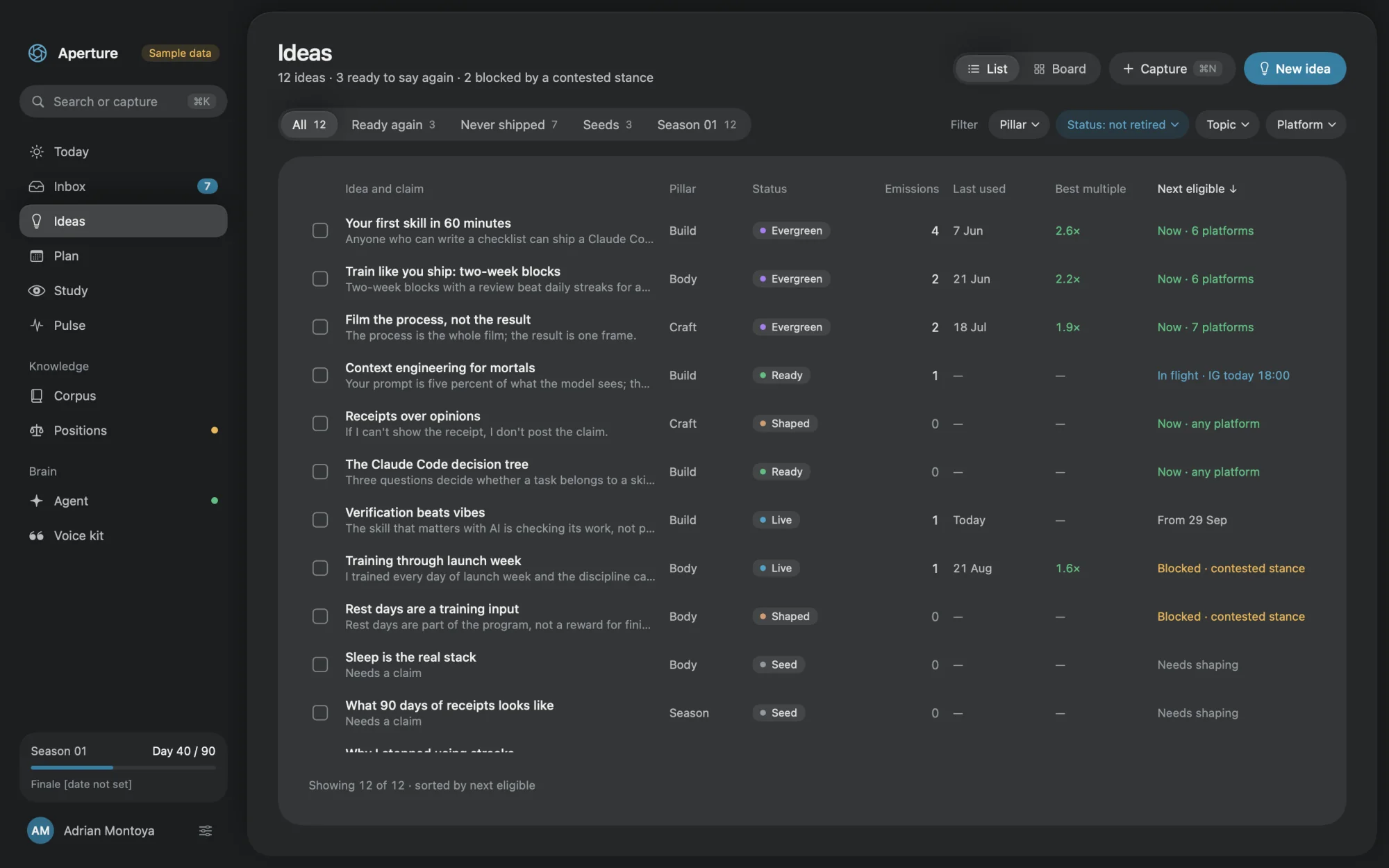
Seed→ Shaped→ Ready→ Live→ Evergreen
The Ideas library: a table of twelve ideas with pillar, status, times used, best result and when each is next eligible.
Adapt

One idea, every platform.

Claude drafts a version for each. You edit. Your edits are saved, so the next draft sounds more like you.

LinkedInX threadIG carouselNewsletter
Voice kit

Drafts that sound like you.

Set your banned words, your favourite words and your length limits. Every draft is checked against them.

Em dashesNone
Banned wordsNone
Length325 / 3,000
Plan

A steady week, without the guesswork.

Set a target per platform. Open slots suggest ideas that are ready to go again.

LinkedIn
1/3
Instagram
1/2
X threads
0/3
Newsletter
0/1
Pulse

Compare every post to your own average.

Log how a post did. Sourdough Space measures it against your usual on that platform, and highlights the ones that beat it by 2× or more.

Best outlier2.6×
Median edit ratio0.62
Posts at 2× or more2
Study

Learn from people you admire.

Track accounts on purpose. Each one needs a reason, so it stays a study list and never turns into a feed.

@framebyframe_liShort-form editing
4.0×
@runlogjonasHonest training vlogs
2.8×
Claude, over a private connector

Claude can read. Claude can suggest. Claude can't decide.

Claude Code connects to Sourdough Space on your Mac. It can look things up and leave proposals. Accepting, scheduling, publishing and deleting stay with you.

Read ideas, corpus, results23 tools
Suggest to your Inbox8 tools
Accept, schedule, publish, deleteYou only
Carousels

Write a carousel and see it as you go.

Eight slides, one type each, with safe zones and a live preview. Text first. Export from your own design tool.
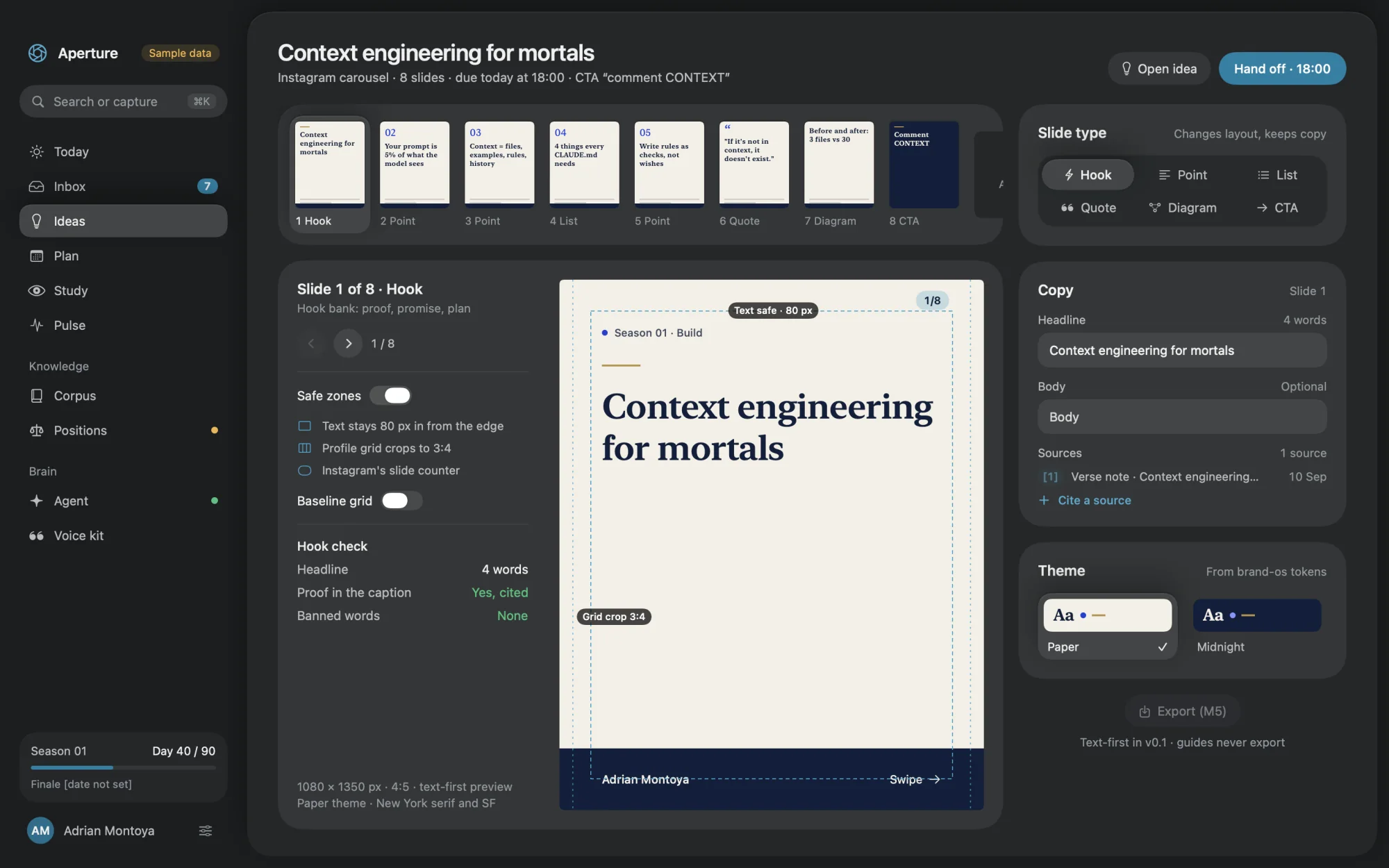
The carousel editor: a strip of eight slide thumbnails, a large preview of slide one with safe-zone guides, and controls for slide type, copy and theme.
Command bar

Everything in one keystroke.

⌘K
Capture a thought⌘N
Brief Claude⌘⇧B
Open Inbox⌘2
Have I said this??
Bring your history

Start with what you already have.

Import a notes folder, past posts and your own frameworks. Run it again any time. Nothing is duplicated.

notes folderposts.csvbrand kitlead magnetsframeworks
Private by design

Your library stays on your Mac.

0
network calls from the app itself. No account. No server.

When you ask Claude to work, it reads what you allow, under your own Claude plan.

Part of your Mac

Menu bar, Spotlight, Siri and Shortcuts.

Menu bar captureSpotlight searchSiri and ShortcutsNotificationsWidgets (signed builds)Keyboard-first
iPhone · in progress

Catch ideas where they happen.

Ideas arrive in the shower, on a walk, in the middle of a call. The iPhone app is for getting them in and getting today's post out.

  • Voice captureSay it. It is transcribed on your phone.
  • Swipe to reviewRight to accept, left to reject.
  • Share from any appSend text, links, images and files.
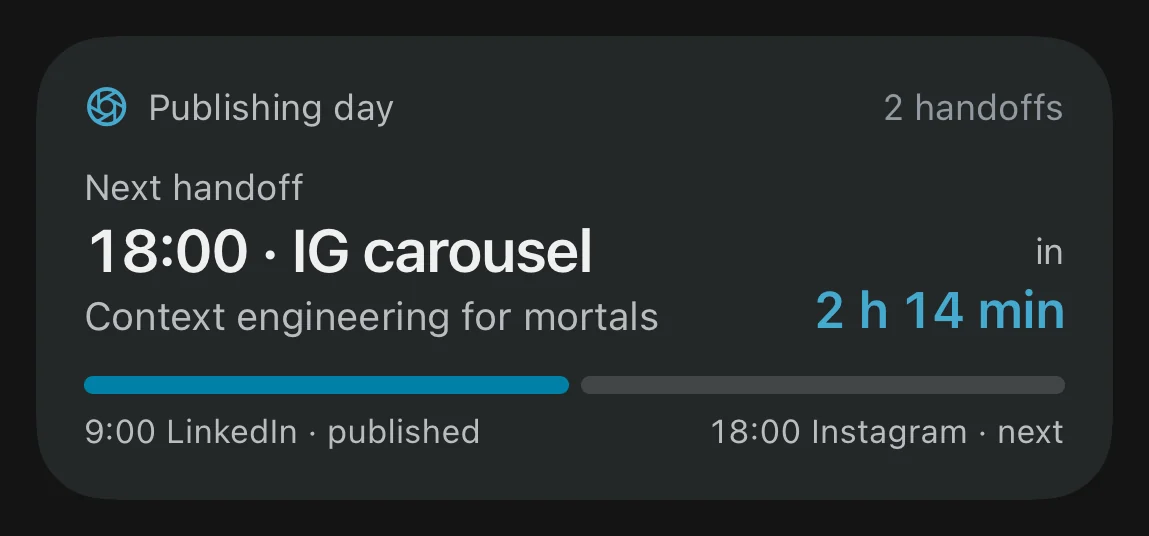
  • Widgets and a Lock Screen countdownSee your next post to hand off, at a glance.

The iPhone app is built and running in the simulator. It is not on the App Store yet.
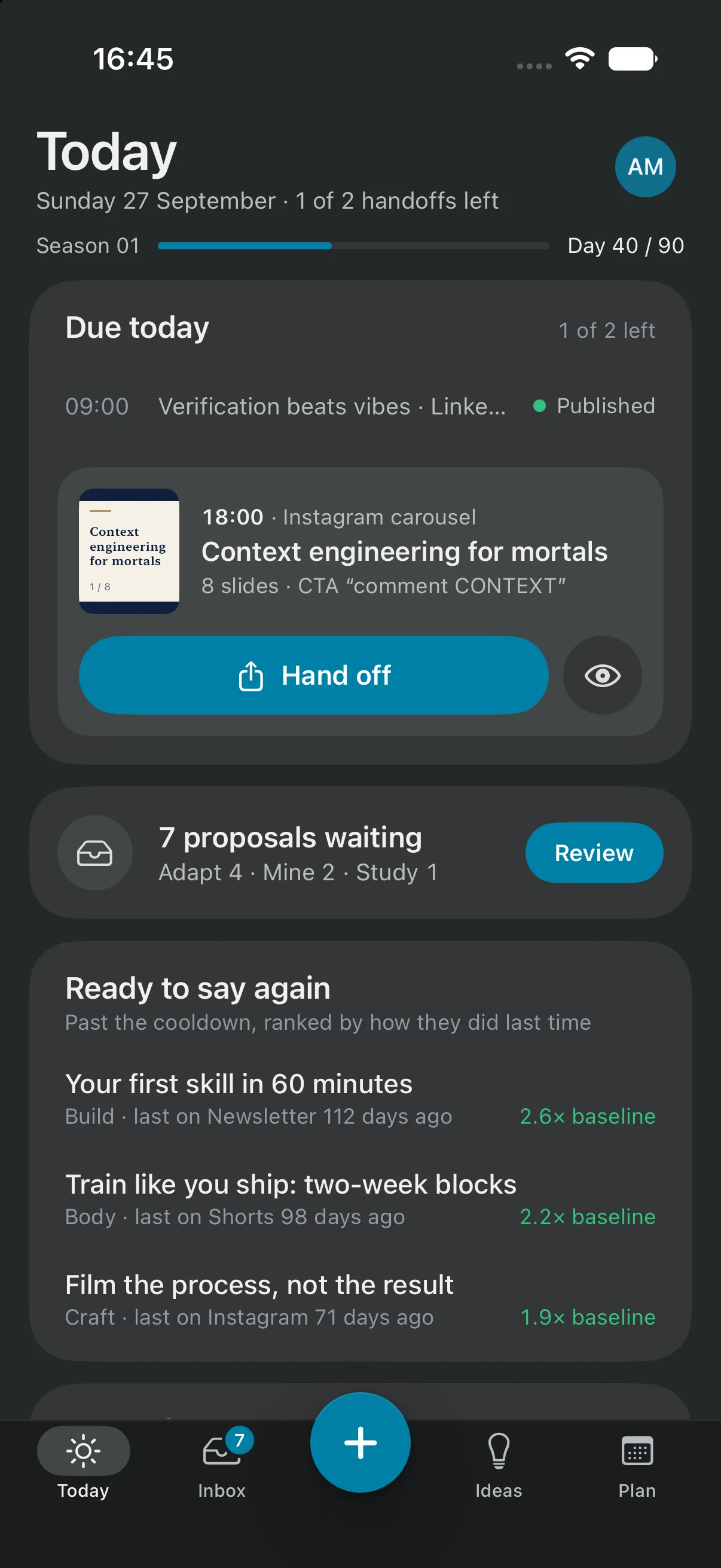
Sourdough Space on iPhone: Today shows the next post to hand off, seven proposals waiting, and ideas ready to say again.
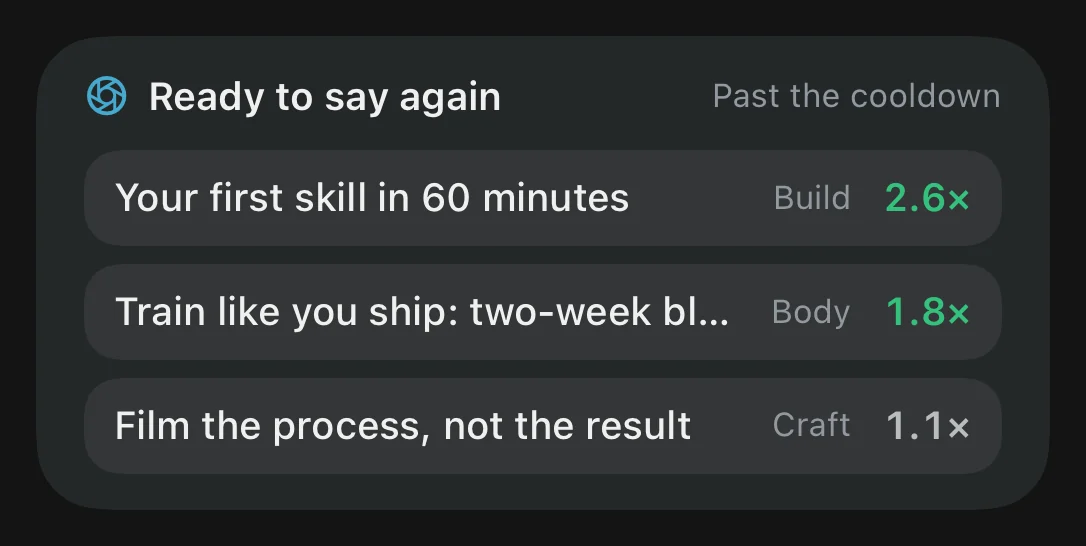
Ready to say again widget listing three ideas with their results.
Publishing day Live Activity: next hand-off at 18:00, in 2 hours 14 minutes.
How it compares

Schedulers manage posts.
Sourdough Space manages ideas.

Most tools start when a post exists. Sourdough Space starts earlier, with the idea, and keeps going after it is published.

Sourdough Space Notes appsNotion, Obsidian SchedulersBuffer, Hootsuite Creator AI suitesTaplio, Hypefury AI chatChatGPT, Claude
Keeps every idea as its own cardSeparate from the posts it becomes
Remembers each time an idea went outWhich platform, which date, how it did
Tells you when it is safe to say againCooldown rules you can change
Blocks claims you can't sourceEvery fact must cite your own words
Warns when you contradict yourselfChecked against stances you wrote down
Drafts in your voiceThrough Claude, with your voice kit
Compares posts to your own averageNot to strangers' numbers
Plans a weekly rhythm per platform
Runs on your Mac, no accountThe app itself works offline
Posts for you on a scheduleSourdough Space leaves this to you, on purpose
Yes Partly, or by hand No

Columns describe each category in general. Individual products vary and change often. Compared in September 2026.

Straight answers

What it does.
What it doesn't.

Sourdough Space is focused on purpose. Here is exactly where the line is.

Sourdough Space does

  • Remember every idea and every time you used it
  • Tell you when an idea is safe to say again
  • Stop drafts that make claims you can't source
  • Flag when a post contradicts what you believe
  • Plan your week around each platform's rhythm
  • Hand you a checklist to post, then log it when you are done
  • Measure every post against your own average
  • Keep your library in one file on your own Mac

Sourdough Space doesn't

  • Post for youYou post by hand. Sourdough Space gets you ready and logs it.
  • Write without Claude CodeDrafts come from Claude Code on your own Claude plan. No Claude, no drafts.
  • Pull your statsYou type in the numbers. Automatic import is planned.
  • Make images or videoCarousels are text plus a preview. Design in your own tool.
  • Work for teamsOne creator, one library. No seats, no sharing.
  • Run everywhereMac and iPhone only, in English. No Windows, Android, web or iPad.
  • Claim to be finishedVersion 0.1. The Mac build is unsigned and the iPhone app is still in progress.
Questions

Good questions.

Is Sourdough Space an AI writer?
No. Sourdough Space is the memory and the rulebook. Claude does the drafting, through Claude Code. Sourdough Space makes sure every draft cites something you wrote and doesn't contradict what you believe.
Do I need Claude Code?
For drafting, studying and finding patterns, yes. You run it on your own Claude plan and connect it to Sourdough Space in a few minutes. Without it you can still capture ideas, plan your week, post from the checklist and log results, but nothing drafts itself.
Does it post for me?
Never. At the scheduled time Sourdough Space gives you a checklist and opens the platform's own composer. You post, paste the live link back, and the ledger logs it.
Where does my data live?
In one file on your Mac. There is no account and no server, and the app makes no network calls of its own. When you ask Claude to work, it reads what you have allowed through a local connector, and that goes to Anthropic under your own Claude plan.
What does "safe to say again" mean?
Each idea has a cooldown. By default an idea waits 120 days before it returns to the same platform in the same format, 30 days for a new format, and 2 days for a different platform. Ideas that clash with one of your stances stay blocked. Every number is yours to change.
Which platforms does it cover?
It plans and tracks LinkedIn, X, Instagram, YouTube, Shorts, TikTok and newsletters. The hand-off checklist opens the composer for all of them except the newsletter, which you send from your own email tool.
Is it for teams?
Not today. Sourdough Space is built for one creator with one voice. There are no seats and no shared libraries.
When can I get it, and what will it cost?
Sourdough Space for Mac is at version 0.1 and is not public yet. Pricing hasn't been announced. Say hello and you will hear first when there is a build to try.
Early access

Open Sourdough Space.

Know what you have said. Know when to say it again. Get a first look before anyone else.